Getting started with Reserve
Boty Reserve is your business’s online booking page: your customers book
without creating an account, with zero double-bookings (the database
guarantees it), and you manage services, staff, schedules and appointments
from the console at reserve.boty.agency/consola.
You can see it working on the demo salon, reserve.boty.agency/r/salon-demo: a real booking page where you can book for real, and whose appointments are wiped every night at 04:00.
To sign in
Section titled “To sign in”- Open a 14-day trial or pick a plan on Pricing.
- Sign in at
reserve.boty.agency/consolawith your Boty account. If someone gave you access by invitation, you sign in through the same place. - The console greets you with the “Puesta en marcha” (getting-started) checklist: it tells you what is missing and takes you straight to each screen.
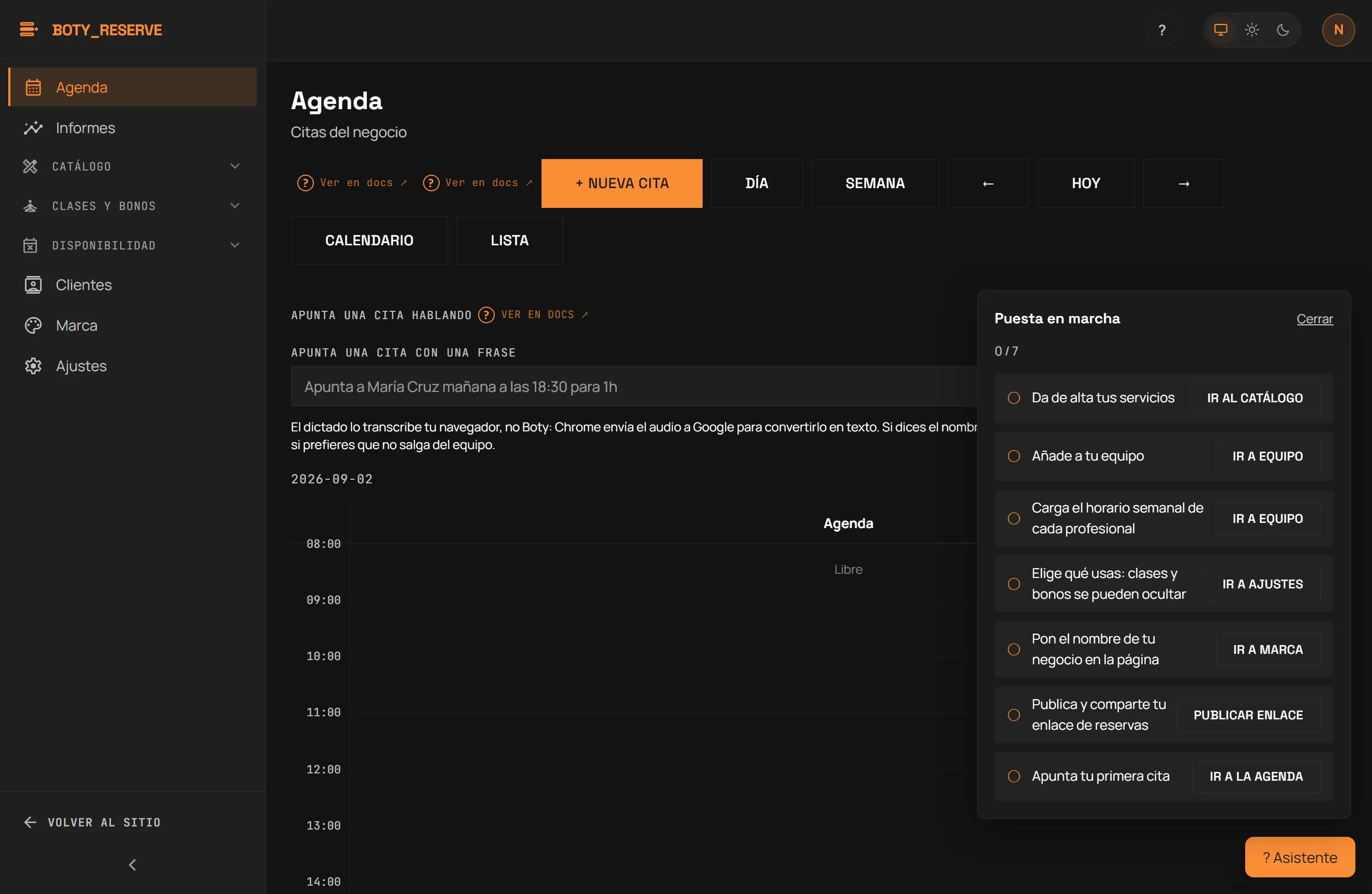
Setup, in the order that works
Section titled “Setup, in the order that works”A bookable slot only exists once a staff member is paired with a service and has a schedule window that covers it. That is why the checklist has this order: skipping it leaves staff invisible on your page with nothing telling you why.
- Add your services — name, duration and price. See Services and staff.
- Add your staff. Every staff member you create is automatically paired with every active service that exists at that moment.
- Load each staff member’s weekly schedule. Without schedule windows, that staff member produces no bookable slot, even with every service already paired.
- Choose what you use: classes and passes can be hidden if your business does not need them. See Settings and Classes and passes.
- Put your business name on the page. See Branding and booking link.
- Publish and share your booking link. See Publishing your booking page.
- Book your first appointment, by hand or with the agenda’s AI quick-add box. See Agenda.
Already have clients somewhere else?
Section titled “Already have clients somewhere else?”You don’t have to re-type them one by one: import your client list from Clients → Import clients.
Where to go for what
Section titled “Where to go for what”- Console guide — the full tour: agenda, catalogue, clients, branding and the assistant.
- Services and staff — catalogue, staff, schedules and who can log into the console.
- Settings — what your business uses, cancellations, your plan and privacy.
- Import clients — paste your list and review it before importing.
- Branding and booking link and Publishing your booking page.
- Agenda, Reminders, your personal calendar and Reports.
- Classes and passes and the booking page, seen from the customer’s side.
- Pricing and Account and cancellation.
How it works
Section titled “How it works”- Your page lives at
reserve.boty.agency/r/<slug>and you can embed it in your site. - Charging still runs through you, as always: the customer books the slot. Deposits at booking: coming soon.
- The waitlist (Pro plan): you can turn on the email offer of a freed slot. The person decides whether to book and nothing is booked automatically: the slot goes to whoever books first.
- Automatic reminders go out by email; they go out by WhatsApp when your business has turned them on and your account has a 360dialog API key configured.
Última verificación: