Settings
Route: /consola/ajustes. Visible to your whole team; editable only by
the owner or manager.
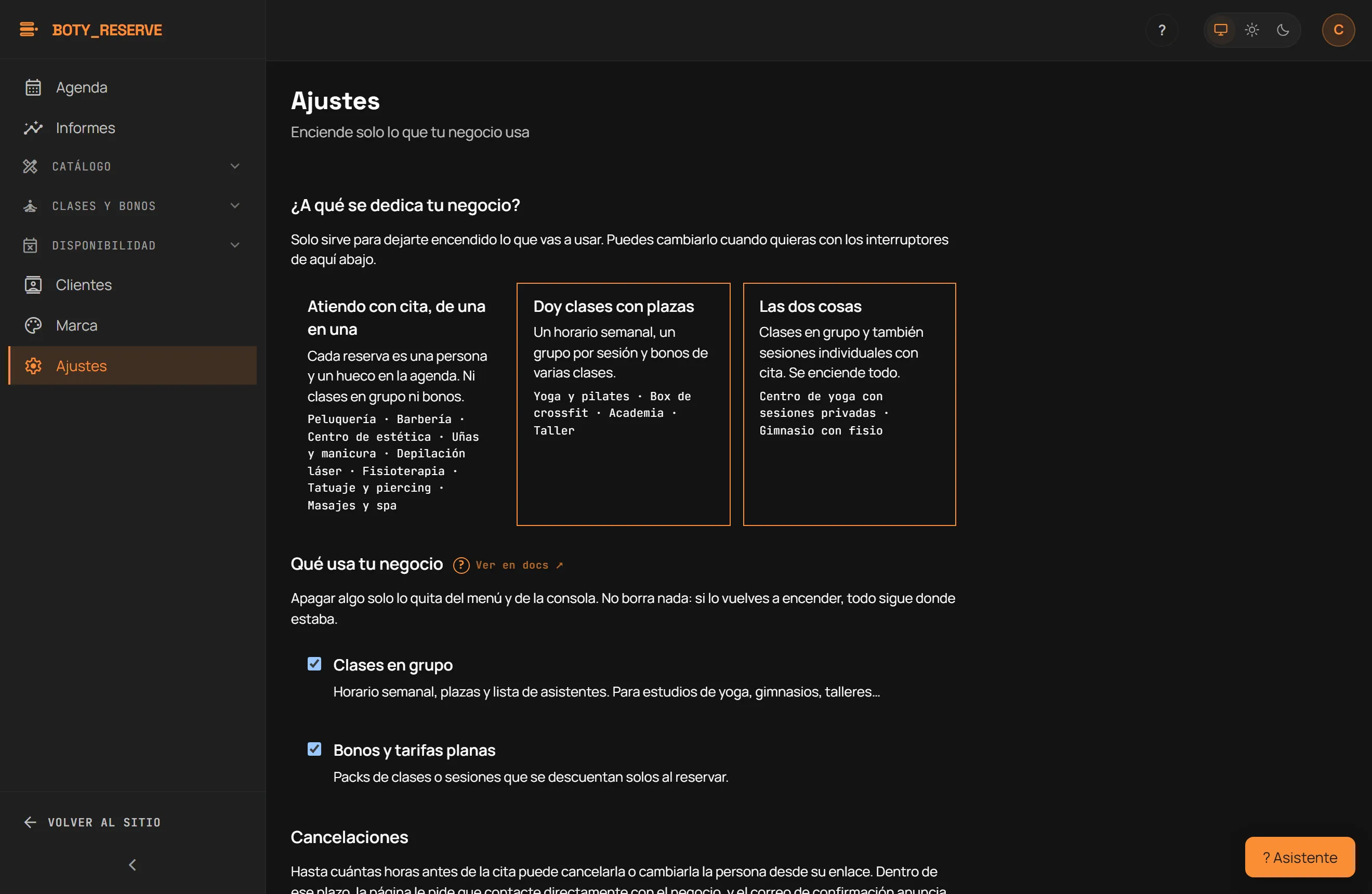
What does your business do?
Section titled “What does your business do?”One question with three answers that preconfigure the two switches below — nothing else is stored, and answering it is not required:
- “Atiendo con cita, de una en una” (I take one-to-one appointments) — neither classes nor passes.
- “Doy clases con plazas” (I run classes with spots) — weekly schedule, one group per session and multi-class passes.
- “Las dos cosas” (Both) — turns classes and passes on together.
What your business uses
Section titled “What your business uses”Two switches, independent of the question above:
- Clases en grupo (Group classes) — weekly schedule, spots and an attendee list.
- Bonos y tarifas planas (Passes and flat rates) — packs of classes or sessions that deduct themselves automatically at booking.
Turning one off only removes it from the menu and the console; nothing is deleted. If you turn it back on, everything is right where it was. See Classes and passes for how each one works.
Cancellations
Section titled “Cancellations”Plazo mínimo para cancelar (horas) (minimum notice to cancel, in hours) decides how many hours before the appointment a client can still cancel or change it from their own link. Inside that window, the page asks them to contact you directly, and the confirmation email quotes the same number of hours. It runs from 0 (cancellable up to the appointment time) to 168 (one week); the starting value is 12 hours.
Booking page caps
Section titled “Booking page caps”Two limits that only apply to bookings made from your public page. Never to what you enter yourself from the console.
- Citas futuras por teléfono (upcoming appointments per phone) — how many future appointments one number may hold at once. It starts at 6. If you work in courses of several sessions, raise it or set it to 0.
- Reservas online al día (online bookings per day) — how many bookings your page accepts in one day. It starts at 60, well above a full day of three chairs.
0 in either one means “no cap”.
Cancelling never counts against anybody: the moment a client releases an appointment they are back under the cap and can book again. The daily cap counts bookings made today, not appointments falling today, so a full Saturday booked three weeks ago consumes none of it.
Whatever gets stopped shows up in Clientes → Actividad inusual (Unusual activity), with the phone and how many times it tried, so you decide what to do. Nothing is blocked automatically.
Unusual activity
Section titled “Unusual activity”A list of what those caps stopped, plus the blocklist, on the same screen — because the only reason to look at a refused attempt is to decide whether to block that number.
Four things can appear:
- Número bloqueado por ti (a number you blocked) — somebody on your blocklist tried to book. No appointment was created.
- Tope de citas por teléfono (phone cap) — one number already held every future appointment you allow. It may be somebody filling slots, and it may be a client booking several sessions: look before you block.
- Tope de reservas del día (daily cap) — your page reached the day’s maximum and refused real bookings from then on. If it was a good day, raise the cap.
- El control de ritmo no estuvo disponible (rate control unavailable) — the system that counts requests failed and bookings went through without being counted. Nothing was refused; it is recorded so it is not invisible.
Blocking a number stops it booking online. It cancels nothing: the appointments it already held stay in your diary and you decide what to do with them. Unblock whenever you like.
An empty screen here is the normal state.
Your plan
Section titled “Your plan”This section always shows your account’s real numbers:
- Your plan’s name.
- “N of M active staff members” (or “unlimited” on Unlimited).
- “AI quota: X actions a month” — your account’s shared credit pool: 30 on Free and Essential, 60 on Pro, 150 on Unlimited.
- The trial days you have left, if you are on a trial.
“Ver planes” (See plans) takes you to the pricing page to purchase or change plans. If card payment is not active on your account, this same section lets you write to us so we activate the plan with you.
Privacy
Section titled “Privacy”Política de privacidad (URL) (privacy policy URL) is the link shown in
the consent line on your public booking page, when a customer books. It is
optional and must start with https://; leave it empty and no link is
shown.
If you need to change your business time zone, write to us.
Assistant permissions
Section titled “Assistant permissions”What the console assistant can run without asking you each time — what you approve with “Hacerlo siempre” (Always do it) from an action card ends up here. With nothing checked, the assistant always asks before touching anything. These permissions are saved in this browser, not on your account: switch computers and you will need to grant them again.
What each setting controls
Section titled “What each setting controls”- The “What your business uses” switches control Classes and Passes.
- Assistant permissions are per browser, not per account: switch computers and you will need to grant them again.
Última verificación: