Reminders
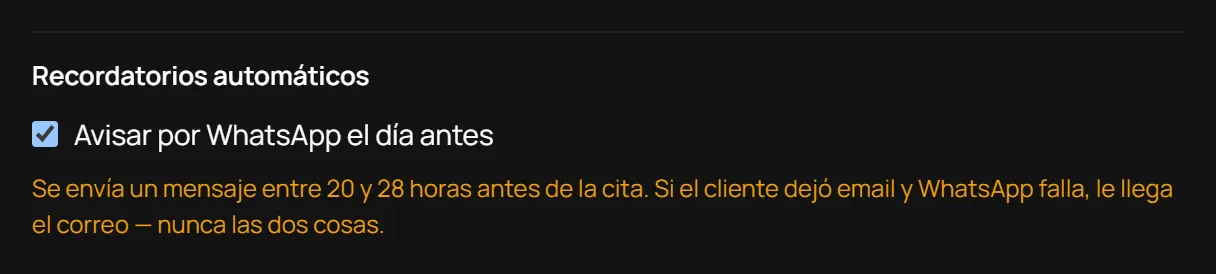
Reserve runs an automated reminder approximately 20–28 hours before each appointment (the sweep runs hourly, so no appointment falls outside the window). It sends:
- An email, if the guest left their address when booking.
- A WhatsApp message, if your account has WhatsApp connected at the platform level and you’ve turned the WhatsApp reminder on in Branding and booking link.
Never both at once: if WhatsApp is on but the send fails, it falls back to email. The mechanism guarantees at most one automated reminder per appointment, never duplicates.
If the guest left no email and WhatsApp is unavailable, no automated notice goes out for that appointment — but the appointment is not lost: it turns up in Recordatorios (Reminders), the screen described just below, for you to send yourself.
Turning automatic WhatsApp on or off
Section titled “Turning automatic WhatsApp on or off”- Open Marca (Branding).
- Scroll to “Recordatorios automáticos” (Automatic reminders).
- If the platform has WhatsApp connected, you’ll see the “Avisar por WhatsApp el día antes” (Notify by WhatsApp the day before) toggle — switch it on or off and save. If the platform does not have WhatsApp connected yet, the console says so right there instead of letting you switch on something that would send nothing.
The reminder outbox
Section titled “The reminder outbox”A phone number is the only thing a guest must give when booking; email is optional. In many salons that means most clients have no email at all, and the automated notice never reaches them. Recordatorios (Reminders), in the menu right below Agenda, is for exactly those.
Every morning it holds tomorrow’s appointments whose guest left only a phone number. For each one:
- Tap Abrir WhatsApp (Open WhatsApp). WhatsApp opens with the message already written.
- You press send. It leaves from your own number, the one your clients already have saved.
- The row disappears from the list.
If you would rather call, or that appointment needs no notice, use Quitar de la lista (Remove from list): it goes away without claiming anything was sent.
The list only shows appointments that are still standing and still ahead. If a guest cancels overnight, her row stops appearing on its own.
You write the message
Section titled “You write the message”Lower on the same screen is the text that gets typed into WhatsApp. Change it to whatever you would actually say. The placeholders in braces are filled from each appointment:
| Placeholder | Replaced with |
|---|---|
{nombre} | The guest’s first name |
{negocio} | Your business name |
{dia} | The day of the appointment, in words |
{hora} | The time |
{servicio} | The service booked |
{profesional} | Who is doing it |
A live preview below shows how it will read before you save. If you write a
placeholder that does not exist — {telefono}, say, or {hoar} with a typo
— the console tells you and refuses to save it, because otherwise your client
would read those braces verbatim.
A line whose only placeholder comes out empty is dropped from the message: an appointment with nobody assigned does not send a dangling “Con”.
No AI writes any of this. The text is yours; all the system does is substitute placeholders with rows from your own diary. Empty the box entirely and it falls back to the shipped default, which a person wrote too.
The manual button in the Diary
Section titled “The manual button in the Diary”Every row in the Agenda (Diary) has a WhatsApp button separate from the automated reminder: tapping it opens WhatsApp with a pre-written message, ready for you to send by hand. Useful for ad-hoc notices — a slot that moved earlier, a last-minute change — and it needs no API key or prior setup.
Limits
Section titled “Limits”- No SMS.
- Classes carry no automated reminder — only one-to-one appointments do.
- The reminder is never doubled: WhatsApp or email, never both.
- If neither email nor WhatsApp is available for a guest, nobody gets an automated notice for that appointment: it lands in Recordatorios for you to send, and the Diary’s manual button keeps working the same either way.
- If a guest has exercised their right to erasure their phone number no longer exists: that row shows as “Sin número utilizable” with no button, rather than a button that opens nothing.
- A WhatsApp send has no delivery receipt. Marking an appointment as sent records that you said you sent it — Reserve never claims anywhere that the message arrived.
Reviews: asking after the appointment
Section titled “Reviews: asking after the appointment”Reserve can send the guest one email the day after their appointment asking for a review on your Google Business Profile link. It is off until you turn it on.
To enable it, in Ajustes → Reseñas (Settings → Reviews):
- Paste your Google Business Profile review link into “Enlace para dejar
reseña (URL)” (it must start with
https://) and save it. - Switch on “Pedir reseña 24 h después de cada cita” (Ask for a review 24 h after each appointment).
The sweep runs hourly and emails the guests whose appointment ended between 24 and 48 hours earlier. The email goes out under your business name, says thank you, includes your link, and tells the guest it is asked only once. No offers, no marketing.
When it is NOT sent
Section titled “When it is NOT sent”- If the switch is off or no link is saved: without a link nothing is sent, even with the switch on.
- If the guest left no email when booking. There is no WhatsApp version.
- If the appointment is cancelled or marked as a no-show.
- If the same guest was already asked for a review at your business in the last 90 days: it is one request per guest per season, not one per appointment. A weekly client gets the email once, not every week.
- If the send fails it is not retried: that guest simply does not get the request. Reserve never sends the same request twice.
Limits
Section titled “Limits”- One-to-one appointments only; classes never ask for a review.
- Reserve neither reads nor publishes reviews: the email leads to the Google page you set, and whatever happens there is between the guest and Google.
- The email text cannot be customised.
Última verificación: